Best Telegram Downloader Tools: Honest Comparison
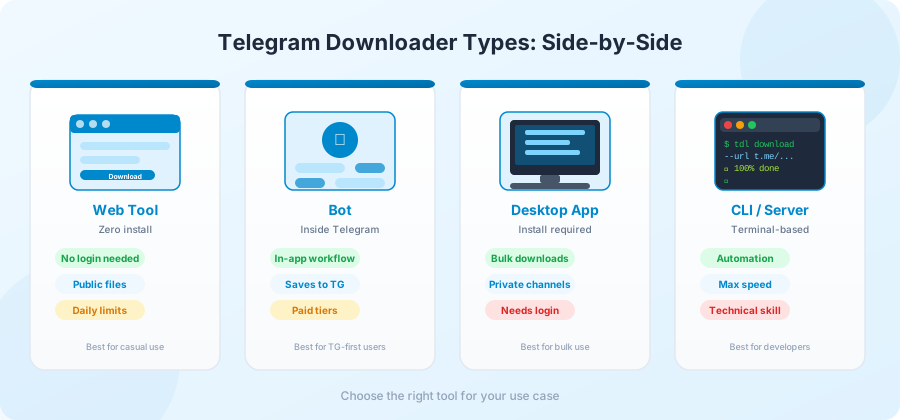
There's no single "best" Telegram downloader. The right tool depends on what you're doing — saving one file, archiving a whole channel, working on a phone, working on a server. This page compares the four main types and helps you pick.
This is not a top-10 list with affiliate links. Every tool listed here exists, has been around for at least a year, and works for the use case described.
Type 1: Web-based downloaders
The simplest kind. You open a website, paste a link, get a file.
How they work: The site runs its own Telegram accounts on the backend. You provide a public link; the site fetches and streams the file to your browser.
When this fits:
- One-off file downloads.
- You're on a borrowed device.
- You don't want to install anything.
- The file is public.
Limits:
- Public channels only.
- Daily download caps (usually 10–20 files).
- Speed depends on the site's infrastructure.
- File size limits vary by site (look for ones that support 4 GB).
Pick this if: you want zero setup and only need a handful of files. This is what most people should start with.
Type 2: Telegram bots
Bots that live inside Telegram itself. You forward or send a link to the bot, and it sends back the file.
How they work: The bot is a Telegram account with code behind it. It reads your messages, fetches the file from the public channel, and sends the file back to you in your chat with the bot.
When this fits:
- You're already in Telegram and don't want to leave it.
- You want the file accessible from any device where you're logged into Telegram.
- You're saving files into your own Saved Messages or another channel.
Limits:
- Many bots have free tiers with limits and paid tiers with higher caps.
- Some bots stop working when Telegram updates its bot API.
- Bots only see public channels by default.
Pick this if: you live in Telegram and want files to land back in Telegram. Avoid bots that ask for unusual permissions.
Type 3: Desktop applications
Standalone apps you install on a computer. The most capable option, but with setup overhead.
How they work: The app connects to Telegram using a real account — usually your own. It reads channels you have access to and downloads files directly.
Pros:
- Can handle very large files reliably.
- Resume on failure works properly.
- No daily limits (subject to Telegram's own rate limits).
- Some support bulk downloads and channel archiving.
- Can access private channels you're a member of.
Cons:
- Requires installation.
- Usually requires logging in with your account.
- Some are open source and trustworthy; some are closed source and worth more skepticism.
Examples:
Telegram Desktop (official app). Built-in export feature under Settings → Advanced → Export Telegram Data. Free, official, handles everything you have access to. Best for personal account archives.
TDLib-based scripts. TDLib is Telegram's official library for building clients. A few open-source projects on GitHub let you batch-download from channels you've joined. Requires command-line comfort.
Pick this if: you need to download hundreds of files, want full speed, or are archiving a private channel you have legitimate access to.
Type 4: Command-line and server tools
For programmers, sysadmins, or anyone moving a lot of files.
How they work: A program runs in a terminal. You give it URLs or channel handles. It downloads in the background, often in parallel.
Pros:
- Maximum speed and reliability.
- Automation-friendly. You can schedule downloads or chain them with other scripts.
- Works on servers — useful for backup pipelines or research datasets.
- Open source means you can audit and modify.
Cons:
- Command-line only. No GUI.
- Requires technical comfort.
- Most use your own Telegram account, with the same risks as desktop apps.
Examples:
-
telegram-cli— long-running open-source CLI client. -
tdl— newer, written in Go, actively maintained. Handles bulk channel downloads cleanly. -
telethon(Python library) — not a tool by itself, but the basis for many custom scripts. Great if you write code.
Pick this if: you're building something automated, archiving a channel for research, or running on a remote machine.
What to look for in any tool
Regardless of type, a few traits separate good tools from bad ones.
Clear about its limits. A good tool says exactly what it can and can't do. A bad one promises everything and delivers nothing.
No mandatory login. If a tool needs your Telegram credentials for basic public-channel downloads, it's overreaching.
Reasonable speed. If a tool consistently delivers very slow speeds on a fast connection, the operator is likely throttling you.
Active development. Last commit on the open-source page from three years ago? It probably still works, but it's not getting fixed when Telegram changes things.
Visible operator. A real company, a real maintainer, a real contact form. Anonymous tools that vanish after a year are common.
A privacy policy that says something specific. "We respect your privacy" means nothing. "We log IP addresses for 30 days, we don't log download URLs" means something.
What to avoid
Some red flags that show up regularly:
- Sites that demand a login on the homepage.
- Tools advertised through pop-up ads.
- Apps that require disabling antivirus or Windows Defender.
- "Premium" tools where the free tier doesn't actually let you download anything.
- Tools that ask for cryptocurrency payments only.
- Apps that ask for unusual permissions (camera, contacts, SMS) — none of these matter for downloading files.
If a tool has more than one of these signals, skip it.
Quick comparison table
| Type | Best for | Setup | Speed | Privacy |
|---|---|---|---|---|
| Web tool | Casual / one-off | None | Medium | High (no login) |
| Telegram bot | In-Telegram workflow | Low | Medium | Medium (depends on bot) |
| Desktop app | Bulk personal use | Medium | High | Lower (requires login) |
| CLI / server | Automation, archives | High | Highest | Lower (requires login) |
A reasonable path for most people
If you're not sure where to start, here's a sensible progression.
Step 1. Use a web-based, login-free tool for casual downloads. This handles 80% of cases.
Step 2. When you hit daily limits or want files inside Telegram, try a well-reviewed bot.
Step 3. When you need to archive an entire channel you're a member of, use Telegram's official desktop app and its built-in export feature.
Step 4.
When you need to automate downloads or run on a server, learn a CLI tool like
tdl
or write something with
telethon
.
Most people stop at step 1 or 2. That's fine — it covers nearly every real-world Telegram download need.
Specific picks for specific tasks
A short cheat sheet.
- Saving one video to your phone: web tool, no install.
- Saving one PDF on a borrowed laptop: web tool, no install.
- Archiving your own saved messages: official Telegram Desktop → Export.
-
Mirroring a public channel for research:
tdlon a server. - Saving everything from a private channel you joined: official Telegram Desktop → Export.
Frequently Asked Questions
Which Telegram downloader is fastest?
Speed varies more by your connection and Telegram's server load than by tool choice. Web tools with good infrastructure match desktop apps for single-file speed. Desktop apps win on bulk.
Can any tool download from private channels without my login?
No. Private channels require an account that's a member, and there's no legitimate way around that. A tool claiming otherwise is either lying or unsafe.
Are open-source downloaders safer than closed-source ones?
Generally yes. With open source, anyone can audit what the tool does. Closed source means trusting the operator. For tools that need your login, this matters a lot.
Will my Telegram account get banned for using a third-party tool?
A login-free web tool can't get your account banned. A tool that uses your account aggressively (high download counts in short windows) can trigger Telegram's automation detection. Use desktop apps sensibly.
Is there a single "best" tool everyone should use?
No. The web-based, login-free option is the best starting point for most people. From there, your needs determine the right next tool.
Do paid Telegram downloaders work better than free ones?
Sometimes. Paid tools often have higher daily limits and better support. They don't usually have better technology — Telegram's API is the same for everyone.
Conclusion
The best Telegram downloader is the simplest one that handles your job. For most people most of the time, that's a clean, login-free web tool with a single input box. Start there.
If you have a Telegram link in mind, the homepage handles it without sign-up, login, or install. Pick a more advanced tool only when you've actually run into a limit that matters to you.