How to Delete Telegram Account
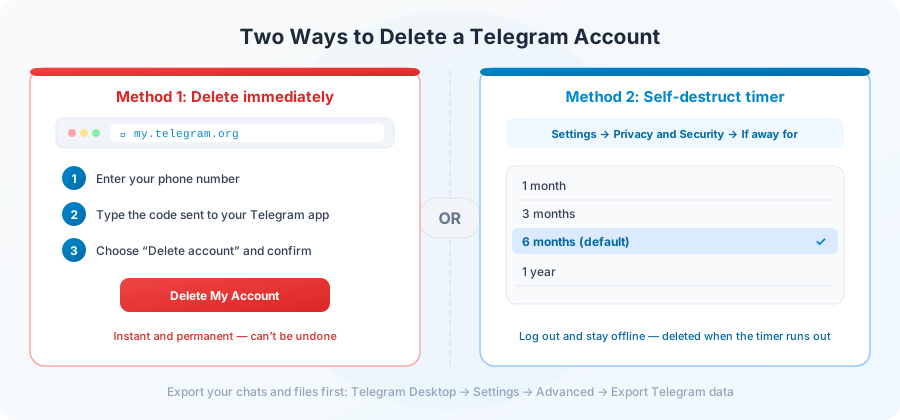
Telegram gives you two official ways to delete your account: delete it immediately on Telegram’s website, or let it delete itself automatically after a period of inactivity. This guide walks through both, explains what actually disappears, and lists what to save before you go.
Important: deletion is permanent. Telegram cannot restore a deleted account, its messages or its contacts.
Before you delete: a quick checklist
Deletion can’t be undone, so take five minutes to do these first:
- Export your data. In Telegram Desktop, open Settings → Advanced → Export Telegram data to save your chats, photos, videos and files.
- Transfer your groups and channels. If you own a group or channel that other people rely on, make someone you trust the owner first.
- Cancel Telegram Premium. If you pay through the App Store or Google Play, deleting your account does not cancel the subscription. Cancel it in your store settings.
- Delete chats you want gone. People you talked to may still see the messages you sent them. If that matters, delete those conversations “for everyone” first.
- Use up Stars and gifts. Telegram Stars, gifts and any balance on the account are lost with it.
- Check linked logins. Websites and bots where you used “Log in with Telegram” will lose access to your account.
Method 1: Delete your account immediately
This is the fastest way. It works in any browser, on a phone or a computer.
- Open my.telegram.org in your browser.
- Enter your phone number in international format, including the country code (for example +44 7700 900123), and tap Next.
- Telegram sends a confirmation code to your Telegram app, not by SMS. Open the app and find the message from Telegram.
- Enter the code on the website to sign in.
- Choose “Delete account”. You can type a reason for leaving, but it’s optional.
- Click “Delete My Account”, then confirm with “Yes, delete my account”.
The account is deleted right away, and you are signed out on every device.
Never share this code with anyone. Telegram will never ask for it in a chat, an email or on a third-party website. The only official page is my.telegram.org.
Method 2: Set your account to self-destruct
If you would rather just walk away, or you can’t receive the code, use the auto-delete setting. If you don’t come online for the period you choose, Telegram deletes the account automatically.
- Open Telegram and go to Settings.
- Tap Privacy and Security.
- Scroll down to “Delete my account” and tap “If away for”.
- Pick a period, such as 1 month, 3 months, 6 months or 1 year.
Then log out of Telegram on all your devices and stay offline. Signing in again at any point resets the timer. The default is 6 months, so an account you simply abandon will be deleted eventually anyway.
What happens when you delete your account
Deletion is immediate and permanent. In practice, that means:
- Your profile, contacts and account settings are removed.
- You leave every group and channel you were a member of.
- Messages you sent may stay in other people’s chats, shown under the name “Deleted Account”.
- Your username becomes free, and someone else can claim it.
- Everything in Telegram’s cloud, including Saved Messages, is gone for good.
Can you come back later?
You can sign up again with the same phone number, but you get a brand-new, empty account. None of your old chats, contacts or groups come back. Telegram may also make you wait a few days before a recently deleted number can register again.
Not sure? Alternatives to deleting
If you only need a break or more privacy, you don’t have to delete anything:
- Log out everywhere. Go to Settings → Devices, end all other sessions, then log out.
- Hide your details. In Privacy and Security, hide your phone number, last seen time and profile photo.
- Mute or archive. Silence busy chats and channels instead of leaving them.
- Keep a safety net. Set the self-destruct timer so the account deletes itself if you never come back.
Frequently Asked Questions
Can I recover a deleted Telegram account?
No. Once it is deleted, the account and its data are gone permanently, and Telegram support can’t restore it.
Can I delete my Telegram account from inside the app?
The self-destruct timer is always in Settings → Privacy and Security. Some app versions also show a “Delete Account” option at the bottom of the profile edit screen. If you can’t find it, the website method works from any browser.
Why didn’t I get the code by SMS?
my.telegram.org sends the code to your Telegram app, not as a text message. If you can’t open Telegram on any device, you can’t delete the account manually, but it will delete itself once the inactivity period in your settings passes (6 months by default).
Will my contacts be notified?
Telegram doesn’t send an announcement. People who chatted with you will simply see “Deleted Account” instead of your name.
What happens to groups and channels I created?
They are not deleted automatically. Transfer ownership to someone you trust before deleting your account so the community keeps an owner.
Does deleting my account delete files I already downloaded?
No. Files already saved on your phone or computer stay there. Only the copies stored in Telegram’s cloud are removed.
Conclusion
To delete your Telegram account right now, go to my.telegram.org, sign in with the code Telegram sends to your app, and choose “Delete account”. If you would rather let it fade out, set the self-destruct timer and log out. Either way, export anything you want to keep first.
Want to save a few files from public channels before you leave? Paste the link on our homepage. No login needed.