Telegram Downloader Without Login: Why It Matters
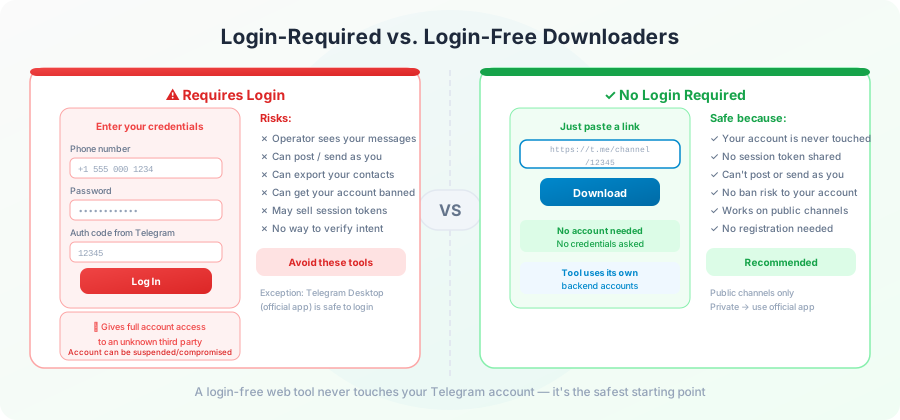
You searched for "Telegram downloader" and quickly noticed something: some of these sites want your Telegram phone number, your password, even the code Telegram sends to your phone. Others just have a box for you to paste a link.
This page explains the difference, why it matters more than people think, and how a download tool can work without ever touching your account.
What "login-free" really means
A login-free Telegram downloader does not ask you for:
- Your phone number
- Your Telegram password
- Your two-step verification code
- A session string copied from Telegram's settings
- A bot token tied to your account
What it needs from you: a public Telegram message link. That's it.
Behind the scenes, the site uses its own Telegram accounts to fetch the file. You stay anonymous. Your account is never touched.
What's at stake if you do log in
A Telegram login is more than a password. It's a key to your entire account history. Here's what someone with that key could do:
- Read every private chat you've ever had on that account.
- See every group and channel you're in.
- See your contacts list.
- Send messages from your account to anyone you know.
- Look at all media in your Saved Messages folder.
This isn't a hypothetical. A site asking for your login is asking for all of this. Even if they only intend to download files, the level of access they're collecting is enormous.
How sites trick you into logging in
A few common patterns to watch for.
"For higher download speeds, log in." Speed isn't actually faster. The site just wants your account for other reasons.
"To download from private channels, connect your account." This is technically true — only your account can access private channels you're a member of. But it means the site gets access to all your other chats, too.
"Telegram requires you to verify your number." False. Telegram doesn't require anything; the site does.
"Connect to remove the daily limit." Maybe true, but the trade-off is your entire account history for some extra downloads.
Login forms that look like Telegram's own.
Some sites copy Telegram's login screen exactly. The URL in your browser is the only way to tell. If it's not
web.telegram.org
or
my.telegram.org
, it's not Telegram.
How a login-free downloader works
A site that doesn't ask for your login operates one of these ways:
Operator accounts. The site owner has registered one or more Telegram accounts. The site uses these accounts to read public channels and fetch files. You never need to provide your own.
Public Bot API. Telegram offers a public bot API that can read public channel content. Some downloaders use this. No user login involved.
Hybrid. Big sites use a pool of operator accounts that rotate so no single account gets flagged for too much traffic.
In all three cases, your role is just to provide the link. The Telegram side is the site's problem to solve.
The drawback: login-free downloaders can only see public channels. Private channels — which need an account that's a member — aren't reachable. That's a limit, not a flaw. It's the trade-off for not giving away your account.
Real risks of giving a site your Telegram login
It's worth being specific, because the cost of getting this wrong is high.
1. Account takeover. If the site is malicious or gets hacked, your login can be used to sign in as you. You'll be logged out of your own account.
2. Conversation leaks. A bad actor with your session can read every chat. Private conversations with friends, family, work colleagues — everything.
3. Impersonation. Messages can be sent from your account to your contacts. Scams targeting your friends often start this way.
4. Two-factor reset. If the site gets your password and your phone number, it has enough to start resetting other accounts that use Telegram as a backup login.
5. Account ban. Telegram detects unusual activity patterns and can ban accounts that look automated. A downloader using your account at scale can get your account flagged.
Safe habits for any download tool
Whether the tool needs login or not, a few habits keep you safer:
- Check the URL. Make sure you're on the actual site you think you're on. Bookmark known-good tools instead of searching for them every time.
- Use a separate browser for downloads. A browser without your main accounts signed in limits damage if anything goes wrong.
- Read the privacy policy. Skim for "we store" or "we share." A good policy says clearly what's collected and why.
- Look for HTTPS. A site that doesn't use HTTPS is leaking your activity to anyone on the same network.
What about Telegram bots?
You'll see Telegram bots advertised as downloaders. A few things to know:
- A bot can read messages you send it. That's how it sees your Telegram link. It doesn't read your other chats.
- A bot doesn't have access to your account. It just receives messages from you, like any contact.
- A bot can also be a scam. If a bot ever asks you to forward a message from Telegram's official account, it's trying to steal your account. Telegram's own contact never asks you for codes or passwords.
Bots are usually safer than sites that ask for your login. But they're not necessarily safer than a login-free website. Pick based on what you need.
When you actually need login (rare)
There are real cases where a login is necessary:
- Downloading from a private channel you're a member of.
- Bulk-downloading your own saved messages.
- Migrating an account's history before deleting it.
For these, the proper tool is Telegram's official desktop app . It has a built-in export feature that handles your whole account. You can find it under Settings → Advanced → Export Telegram data. No third-party site needs to be involved.
Anyone offering a website that does the same thing is asking for trust they probably don't deserve.
The trade-off you're making
A login-free downloader is for public files only . You can't download from private channels. You can't access your own saved messages.
A login-required downloader could in theory do all of those, but you're betting that the operator never gets hacked, never gets bought, and never changes their privacy practices.
For 95% of people, the public-only limit is fine. The files you actually want to download are almost always in public channels.
How to spot a login-free tool
Quick check: open the site and look at the homepage. If it has:
- A single input box for a URL
- A download button
- No sign-up form
- No "Connect with Telegram" button
…it's login-free. That's the entire test.
If the first thing you see is a phone number field or a "Sign in" button, walk away.
Frequently Asked Questions
Is it safe to log in to a third-party Telegram downloader?
Almost never. Even well-meaning sites have been breached, and the cost of a Telegram login leak is very high. Stick to login-free tools whenever possible.
Can I download from a private channel without logging in?
No. Private channels are private by design. The only legitimate access path is through a Telegram client where you're already a member.
Will I get tracked or watched if I use a login-free downloader?
The site sees the link you paste and your IP address. Beyond that, with no login, there's nothing personal to track. Pick a site with a clear privacy policy if this matters to you.
Are login-free downloaders slower?
No. The speed comes from the site's connection to Telegram, not from your account. A login-free tool with good infrastructure is just as fast as a login-required one.
Why do some sites still demand a login if they don't need to?
Three reasons: they can collect user data, they can charge subscriptions per account, or they're outright scams. None of these benefits flow to you.
Can my Telegram account be banned for using these tools?
A login-free tool can't get your account banned because it never touches your account. A login-required tool could, if it triggers Telegram's automation detection.
Conclusion
Asking for your Telegram login is asking for everything: chat history, contacts, group membership, and the ability to impersonate you. A legitimate download tool doesn't need any of this. If a site asks for it, the trade isn't worth it.
For everything you'd normally want a downloader for — saving a public video, a PDF, a song — a login-free tool handles it. Try one on the homepage with a public link and see for yourself.