Telegram Direct Download Link Generator: What It Is
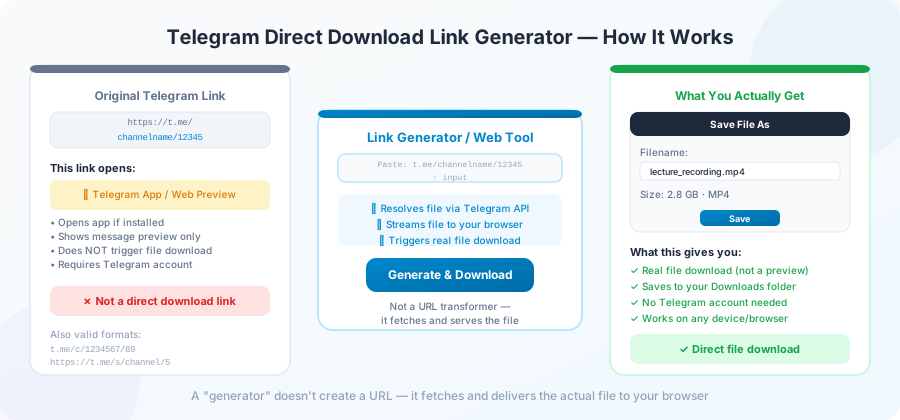
A lot of people search for a "Telegram direct download link generator" expecting one specific thing — a tool that turns a
t.me/...
link into a clean download URL they can share or paste into a download manager.
The reality is more interesting and a bit messier. This page explains what these tools really do, what to watch out for, and when you actually need one.
What people mean by a "direct download link"
A direct download link is one that starts your download the moment you open it. No preview page, no buttons, no countdown. Click it, save it, done.
For files on Telegram, a "direct link" usually means a URL like this:
https://yourdownloader.com/api/download?url=https://t.me/channel/12345When you open it, the tool talks to Telegram on your behalf and sends the file to your browser. The end user doesn't have to paste anything into a form.
Some sites instead try to give you the file's true CDN address — the URL where Telegram actually stores it. These are short-lived (they expire after a few minutes) and rarely useful unless you're a programmer.
What a real generator does, step by step
Here is the simple version of what's happening behind the scenes.
- You give it a Telegram message link.
- It checks the link is real and public.
- It builds a new URL that points at its own server, with your Telegram link tucked inside.
- It hands you back the new URL.
When someone opens that new URL, the site does the actual Telegram fetching and streams the file straight to their browser. That's it. There's no magic. The "generator" is really just a way to wrap a Telegram link in a URL that does the work automatically.
When this is genuinely useful
A few real reasons to want a direct link:
- Sharing in a group chat where most people don't know how to use a downloader.
- Putting a file behind a single link in a blog post or document.
- Feeding the link into a download manager like aria2, JDownloader, or wget on a server.
- Embedding a download in a script that runs without a person clicking buttons.
If your use case is none of these, you probably don't need a generator at all. Just use the downloader's normal paste-the-link page.
What to watch out for
Not every "direct link generator" is honest. A few common problems.
Sites that ask for your Telegram login. No generator needs your phone number or password. If a site asks, leave.
Sites that store the file. A real generator doesn't keep your file. It just builds a URL that fetches it when opened. Sites that upload the file to their own servers and then give you a link are something different — usually a file host with extra steps.
Sites that add ads or redirects. Some generators wrap your link in a chain of advertising redirects. The user clicks "download" and ends up on three different sites before the file starts. Skip these.
Generators that hide the original link. A trustworthy tool either shows the Telegram link inside the generated URL or makes clear what's happening. Tools that scramble the URL so you can't tell where it points are often hiding shady tracking.
A short example
Let's say you have this Telegram message link:
https://t.me/coolchannel/42A clean direct-link generator will turn it into something like:
https://yourdownloader.com/api/download?url=https://t.me/coolchannel/42Now you can share that URL anywhere. Whoever clicks it gets the file. No instructions needed.
Direct link vs paste-the-link tool — which do you need?
Most people only need the regular paste-the-link page. If you're downloading one file for yourself, there's no reason to add a step.
You only need a generator if:
- You're sharing the link with someone else.
- You're putting the link on a webpage or in a document.
- You're feeding it to a script or a download manager.
For everyday use, just open the homepage , paste the link, and click Download.
Direct links and download managers
If you use a download manager like aria2, wget, or JDownloader, a generated direct link is the cleanest way to feed Telegram files in. The download manager treats the URL like any other download — handling pauses, retries, and parallel parts.
Example with wget (a command-line tool on Linux and Mac):
wget "https://yourdownloader.com/api/download?url=https://t.me/coolchannel/42"Example with aria2:
aria2c "https://yourdownloader.com/api/download?url=https://t.me/coolchannel/42"These tools handle large files much better than browsers do. If you regularly grab files over a gigabyte from Telegram, this combo is worth the small setup time.
How long do direct links last?
If the generator points at its own server (most do), the URL works for as long as the site is up. If the channel deletes the message, of course, the file becomes unreachable through any link.
Some generators give you actual Telegram CDN URLs — these expire in 5 to 60 minutes. That short window is a Telegram thing, not the tool's choice. If you see a "link expired" message and the underlying Telegram message still exists, just regenerate.
Privacy considerations
Three quick rules:
- Never share a generated link to a private file you didn't mean to make public. Anyone with the link can download.
- Don't share generated links from channels you don't want to reveal you visit. The link contains the original Telegram URL.
- If you need real privacy, use a generator that supports passcodes or short expiry times.
When a generator is the wrong tool
A direct link generator is not a backup tool. It doesn't save the file forever. If the channel deletes the message tomorrow, your link breaks tomorrow.
For permanent saves, download the file once and store it yourself — on your drive, in cloud storage, or on a USB stick. We have a guide on saving Telegram files to Google Drive for the cloud-storage path.
Frequently Asked Questions
Are Telegram direct download link generators legal?
The generator itself is fine — it's just a URL builder. Whether the file behind the link can be legally shared depends on who owns the content. Public channel content is generally fine to view and save, but redistribution is a separate question.
Will the link still work if I share it with someone in another country?
Usually yes. The download happens on the generator's server, so as long as that server can reach Telegram, the file flows through.
Why does the generator give a different URL than the Telegram CDN address?
Because the CDN address is temporary and tied to the request. A wrapper URL points at the generator's server, which fetches a fresh address every time someone opens the link.
Can I make a direct link that only works once?
Some generators support one-time links. If yours doesn't, you can't enforce single use — anyone with the URL can open it as many times as they like.
Do direct link generators slow down my downloads?
They add one small step on top of the normal download path. In practice, the slowdown is unnoticeable for most files.
What's the difference between a direct link and a permalink?
A direct link starts a file download. A permalink (
t.me/channel/12345
) just opens the message in Telegram. They look similar but do different things.
Conclusion
A direct download link generator is a small but useful tool — a way to wrap a Telegram link in something that just works when shared. It's not a backup, it's not magic, and it doesn't need your account credentials. If a generator asks for those, it's not the kind of tool you want.
For a quick start, paste any public Telegram link on the homepage — that's the same engine a generator uses, just without the wrapper.