Telegram File Download by Link: A Simple Guide
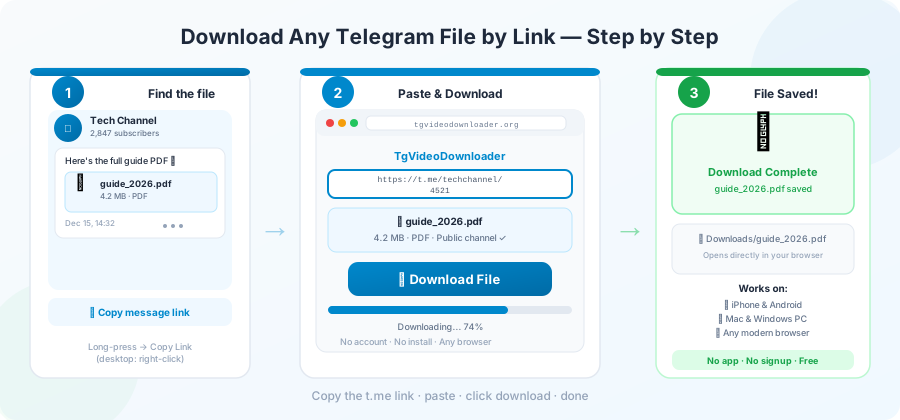
You saw a file in a Telegram channel — a PDF, a video, a song, a zip — and you want to save it on your phone or computer. You don't want to install the Telegram app. You don't want to sign up for anything. You just want the file.
That's what this guide is for.
Downloading by link works for any file shared in a public Telegram channel. It does not work for private groups or invite-only channels. We'll explain why later. First, the part you actually came for.
What "downloading by link" really means
When someone shares a file in a public Telegram channel, that message gets its own web address. It looks like this:
https://t.me/somechannel/4821The number at the end is the message number. The file itself is stored on Telegram's servers, not on the person who shared it.
A link-based downloader does three simple things:
- Connects to Telegram for you.
- Finds the file the link points to.
- Sends the file straight to your browser, so it saves to your device.
You never open the Telegram app. You never log in. You paste a link, you get a file.
Step-by-step: how to download
Here's the easiest way to do it on our site.
1. Find the message you want.
Open the Telegram channel in your browser, phone, or computer. Tap
the message that has the file. You'll see a "Copy Link" option.
2. Copy the full link.
Make sure it starts with
https://t.me/
and ends in a number. If it starts with
t.me/joinchat/
or
t.me/c/
, it won't work — those are for private channels and invite links.
3. Paste it into the downloader.
On our
homepage
, there's a single box where you paste the link. The example shown
is
https://t.me/channel_name/123456
.
4. Click Download.
The site will check the file first — name, size, type — and show
it to you. Then it will give you a Start Download button. This
two-step check is on purpose, so you don't accidentally pull a 3
GB file on mobile data.
5. Save the file.
The file downloads straight to your device. You can pause it,
resume it, or cancel it, just like any normal download.
Which links work and which don't
Telegram has a few kinds of links. Only one type works for downloads.
| Link type | Example | Works? |
|---|---|---|
| Public channel message |
t.me/durov/12
|
Yes |
| Public group message |
t.me/groupname/42
|
Yes, if the group is public |
| Private channel |
t.me/c/123456789/42
|
No |
| Invite link |
t.me/joinchat/AAAA...
|
No |
| Channel home page |
t.me/durov
|
No — it's not a file |
| Sticker pack |
t.me/addstickers/X
|
No |
If you paste a link that doesn't work, you'll see a clear message telling you what's wrong. That's on purpose — quick clear errors are better than slow confusing ones.
How big a file can you download?
Telegram itself lets people upload files up to 4 GB if they have a Telegram Premium account, or 2 GB if they don't. A link-based downloader has to handle whatever was actually shared. So:
- Small files (under 50 MB) finish in seconds.
- Medium files (50 MB to 1 GB) usually take a few minutes.
- Large files (1 GB to 4 GB) work fine if your internet is steady.
If you're on a phone and need a very large file, switch to Wi-Fi first. Also turn off battery saver for your browser. Phones often pause apps in the background to save battery, and that can stop your download halfway.
For more on this, see our guide to downloading large Telegram files in the browser .
Why only public links?
This is a fair question, and there's a clear answer.
Public Telegram channels are like public social media accounts: anyone with the link can see what's in them. Telegram's own rules allow tools like ours to read public channel messages on your behalf. That's what makes link downloads possible.
Private channels and groups are different. You can only see them
if you're a member. The
t.me/c/...
link only works if you're already inside the channel on your own
Telegram account. A tool that claims to download from private
channels is either lying or asking you to hand over your account
login — which is risky.
If the channel you want is private, the only safe way is to join it inside Telegram first, then save the file through the app.
What about safety and privacy?
A few things to think about when using any download site.
Some tools ask you to log in with your Telegram account. They want your phone number, your password, even your two-step code. Don't do this. Once you give that out, the site can read all your messages, see who you talk to, and even send messages as you. A login-free downloader keeps you safe from this. We wrote more about this in our piece on why a Telegram downloader without login matters .
Other than that, every download site has to handle the file as it passes through. What you want is a tool that streams the file — meaning the file goes straight from Telegram, through the site, to you, without being saved on the site's servers. Once your download finishes, nothing is left behind.
When something goes wrong: quick fixes
If your download fails, check these first.
-
"Invalid Telegram URL format"
— your link is probably from a private channel (
t.me/c/...) or an invite link. Get the public message link instead. - "This file is no longer available" — the person who shared it deleted the message, or the channel was removed. Nothing any downloader can do about this.
- "Server is currently busy" — too many people are using the site right now. Wait a few minutes and try again.
- "Daily download limit reached" — most free tools cap downloads per day to stop misuse. Ours allows 10 files in 24 hours.
- Download stops at 30% — your browser tab went to sleep, or your internet hiccuped. Try again with the tab in front.
We have a full list of fixes in our Telegram download errors guide .
Tips that actually speed up your download
A lot of advice online is just noise. Here is what really helps.
- Use Wi-Fi or a wired connection. This makes the biggest difference.
- Stay near Telegram's servers. Telegram has servers around the world. The closer you are, the faster the download.
- Keep the tab in front. Don't switch to another tab while a big file is downloading.
- Try without a VPN. A VPN often slows downloads. If you must use one, pick a server close to you.
- Download one file at a time. Two downloads at once will share your internet, not double it.
Anything claiming a "secret trick" to make Telegram faster is selling you nothing. The real bottleneck is your internet, sometimes Telegram, and never some hidden setting.
Does the file type matter?
Not at all. A link-based downloader doesn't change anything about
the file. If the message had a
.mp4
, you get an
.mp4
. If it was a
.pdf
, you get a
.pdf
. The file you get is exactly the same as what was originally
shared.
There is one small thing to know: Telegram sometimes makes a smaller version of videos so they play smoothly inside the app. If you want the full original video, look in the channel — sometimes people share both the streaming version and the full file. We cover this in Telegram video to MP4 download guide .
Who uses link-based downloads?
A few real examples:
- Researchers saving public-channel posts for a study.
- Reporters keeping copies of public Telegram posts before they get deleted.
- Students saving lecture videos shared in study groups.
- Hobbyists grabbing podcast episodes from public channels.
In each case, the person could already do this inside the Telegram app. A link-based tool just skips the install, the sign-up, and the menu hunting.
Frequently Asked Questions
Can I download from any Telegram link?
No. Only public channel and public group message links work.
Anything that needs you to be a member of a private channel cannot
be downloaded by link.
Do I need a Telegram account to use a link-based downloader?
No. A proper link-based downloader handles the Telegram side for
you. You only need the public link.
Is it legal to download from a public Telegram channel?
Saving content from a public channel is usually fine, the same way
saving an image from a public website is fine. Whether you can
share that file with others depends on who owns it.
What is the largest file I can download by link?
Up to Telegram's own 4 GB limit. Files bigger than that simply
can't exist on Telegram in the first place.
Why does my download keep failing partway?
The most common reason is your browser tab going to sleep in the
background. Keep the tab in front until the download finishes.
Does the downloader save my file on its servers?
A streaming downloader doesn't — the file goes straight from
Telegram to your browser. Avoid any site that asks you to wait for
"preparation" or sends you a link by email; those work
differently.
Conclusion
Downloading from a Telegram link should be paste-and-click. Nothing more. The hard parts — talking to Telegram, handling big files, keeping the download steady — are the tool's job, not yours.
If you have a Telegram link in your clipboard right now, paste it on the homepage and try it. No login, no install, no signup.